




S Pen Galaxy Tab S11/S11 Ultra 5G (X736/X936B) White
Key Features of the S Pen for Galaxy Tab S11/S11 Ultra 5G (X736/X936B) - White:
Seamless Integration: Designed specifically for the Galaxy Tab S11 and S11 Ultra 5G models, this S Pen ensures flawless compatibility and functionality with your device.
Enhanced Precision: Offering a natural writing experience, the S Pen allows for precise sketching, note-taking, and editing, mimicking the feel of a real pen on paper.
Wireless Charging: The S Pen conveniently charges wirelessly when attached magnetically to your Galaxy Tab, ensuring it’s always ready for use.
Air Actions: Enjoy the convenience of intuitive gesture controls, allowing you to manage presentations, navigate apps, and more with a simple wave or click.
Button Customization: With the customizable button, you can assign your most frequently used functions for quick access and increased productivity.
Long Battery Life: On a full charge, the S Pen offers extended use time, minimizing interruptions for a smooth creative process or workflow.
Ergonomic Design: Crafted for comfort, its balanced weight and slender build reduce fatigue during prolonged use, enhancing your overall efficiency.
Low Latency: Experience near-instantaneous response as the pen fluidly syncs with the display, providing a lag-free writing and drawing experience.
Elegant Aesthetic: The sleek white finish complements the design of the Galaxy Tab S11 series, adding a touch of sophistication to your tech ensemble.
Smart Select & Screen Write: Quickly capture, edit, and share content with easy access to smart features that streamline your tasks.
Unlock the full potential of your Galaxy Tab S11/S11 Ultra 5G with this high-performing, versatile S Pen, designed to enhance productivity and creativity.
Product Description: 13MP Main Rear Camera for Galaxy Tab S11 Ultra 5G (X936B)
Capture the brilliance of your world with the precision and excellence of the 13MP Main Rear Camera for the Galaxy Tab S11 Ultra 5G (X936B). Designed to seamlessly integrate with your device, this camera module represents the pinnacle of clarity, performance, and convenience, ensuring every snapshot is picture-perfect.
Key Benefits:
- Stunning Clarity: Delivering exceptional image quality, the 13MP camera captures life-like photos with vibrant colors, sharp details, and enhanced depth. Whether it's a breathtaking landscape or an intimate portrait, every image is preserved with outstanding clarity.
- Seamless Integration: Specifically designed for the Galaxy Tab S11 Ultra 5G (X936B), this replacement camera ensures an effortless fit, maintaining the sleek aesthetic and robust functionality of your device.
Technical Specifications:
- Resolution: 13 Megapixels
- Sensor Type: CMOS
- Aperture Size: f/1.8 for superior low-light performance
- Focus: Auto-focus with touch-focus capability
- Additional Features: HDR, Panorama, and Face Detection
- Video Recording: Supports 4K video capture at 30fps
Compatibility:
- Exclusively crafted for the Galaxy Tab S11 Ultra 5G (X936B)
- Not compatible with other models or brands
- Ensures perfect hardware and software compatibility, maintaining optimal device performance
Recommended Use: Ideal for users seeking an OEM-quality replacement or upgrade, this camera component is perfect for capturing daily moments, travel adventures, and professional tasks with the highest fidelity.
Installation Instructions:
- Preparation: Ensure your device is powered off and disconnected from any power source.
- Tools Required: A precision screwdriver set suitable for electronics, and a plastic pry tool.
- Removal: Carefully open the rear of the device by unscrewing the back panel. Use the pry tool to gently separate the rear cover.
- Replacement: Locate the existing rear camera module and carefully detach it from the motherboard connector. Align the new camera replacement module and secure it by pressing gently until it clicks in place.
- Assembly: Reattach the back panel and fasten the screws securely.
- Power On: Restart your Galaxy Tab S11 Ultra 5G and check the camera functionality to ensure proper installation.
Warranty Information: Enjoy peace of mind with a 12-month warranty, covering defects in materials and workmanship. Please note: This warranty does not cover any Service Packs. Should any issues arise, our dedicated customer service team is ready to assist you.
Elevate your photography to exceptional heights with the 13MP Main Rear Camera for Galaxy Tab S11 Ultra 5G (X936B). Experience unmatched image quality that captures the world in its purest form, each and every day.

- Name : Lifetime Warranty
- Description
SPARE PARTS WARRANTY (TELEPHONY/TABLETS) :
Screen definition:
The screen is made up of several elements: a glass, a touchscreen, a slab, a chassis and a backlight.
Warranty definition:
The slab (display) is GUARANTEED FOR LIFE (this guarantee is limited to the life of the phone).
All other components are covered by a 30-day warranty against hidden defects and non-conformity.
Example of problems covered by the warranty :
- White spots
- Touch bug
- Dead pixels
- Detached chassis
- Wrong screen size
- Screen malfunction, connection problem between screen and home button due to screen.
- Proximity sensor malfunction due to screen.
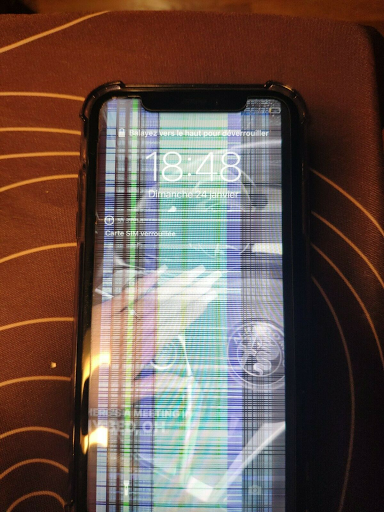
Screen warranty limitations: No warranty will be honored if your screen has any of the following problems (non-exhaustive list):
- Cracks
- Break
- Burning, Overheating
- Black spot
- Screen won't turn on
- Lost or missing components
- Oxidation
Example of a defect not covered by warranty:
Please note that Samsung and Huawei Service Pack displays are not eligible for our warranty program. Therefore, no exchange or refund will be made on these parts.
Click here to get more details